Appearance
DateSelector Component
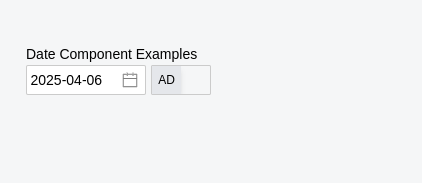
A date input component with integrated AD/BS (Gregorian/Nepali) calendar toggle. Provides a date picker for either calendar system, automatic format conversion, and configurable default date behavior.
Table of Contents
Import
ts
import { DateSelector } from "dolphin-components";
import type { DateSelectorProps } from "dolphin-components";
Basic Usage
vue
<template>
  <DateSelector v-model="selectedDate" />
  <p>Selected date (AD): {{ selectedDate }}</p>
</template>

<script setup>
import { ref } from "vue";
import { DateSelector } from "dolphin-components";

const selectedDate = ref("");
</script>
Props
| Prop | Type | Default | Description |
|---|---|---|---|
modelValue | string | "" | The selected date in AD format (YYYY-MM-DD). Supports v-model. |
inputWidth | number | — | Width of the date input field in pixels. |
isBS | boolean | false | Whether to display the date in BS (Nepali) format by default. |
showToggle | boolean | true | Show or hide the AD/BS toggle button. |
disabled | boolean | false | Disable the date input, preventing user interaction. |
classValue | string | "" | Custom CSS classes applied to the date picker input field. |
defaultDate | boolean | false | If true, sets today's date as the default value on mount. |
Events
| Event | Payload | Description |
|---|---|---|
update:modelValue | string | Emitted when the selected date changes. Always in AD format (YYYY-MM-DD). |
update:isBS | boolean | Emitted when the calendar format toggle is switched. |
TypeScript Interfaces
typescript
interface DateSelectorProps {
  modelValue: string;
  inputWidth?: number;
  isBS?: boolean;
  showToggle?: boolean;
  disabled?: boolean;
  classValue?: string;
  defaultDate?: boolean;
}
Usage Examples
Default to Today's Date
vue
<template>
  <DateSelector v-model="date" :defaultDate="true" />
</template>

<script setup>
import { ref } from "vue";
import { DateSelector } from "dolphin-components";

const date = ref("");
// On mount, `date` will be set to today's date in YYYY-MM-DD format.
</script>
Start in BS Mode
vue
<template>
  <DateSelector v-model="date" :isBS="true" />
  <p>Stored value (always AD): {{ date }}</p>
</template>

<script setup>
import { ref } from "vue";
import { DateSelector } from "dolphin-components";

const date = ref("2026-07-10");
</script>
Without Toggle Button
vue
<template>
  <DateSelector v-model="date" :showToggle="false" />
</template>

<script setup>
import { ref } from "vue";
import { DateSelector } from "dolphin-components";

const date = ref("");
</script>
Disabled State
vue
<template>
  <DateSelector v-model="date" :disabled="true" />
</template>

<script setup>
import { ref } from "vue";
import { DateSelector } from "dolphin-components";

const date = ref("2026-01-15");
</script>
Custom Width and Class
vue
<template>
  <DateSelector v-model="date" classValue="w-full" />
</template>

<script setup>
import { ref } from "vue";
import { DateSelector } from "dolphin-components";

const date = ref("");
</script>
Form Integration
vue
<template>
  <form @submit.prevent="submitForm">
    <div class="mb-4">
      <label class="input-label">Date of Birth</label>
      <DateSelector v-model="formData.dob" :showToggle="true" />
    </div>
    <div class="mb-4">
      <label class="input-label">Hire Date</label>
      <DateSelector v-model="formData.hireDate" :defaultDate="true" />
    </div>
    <button type="submit" class="btn btn-primary">Submit</button>
  </form>
</template>

<script setup>
import { reactive } from "vue";
import { DateSelector } from "dolphin-components";

const formData = reactive({
  dob: "",
  hireDate: "",
});

const submitForm = () => {
  console.log("Form data:", formData);
};
</script>
Screenshot
Best Practices
- Always use AD format for
v-model— The component stores and emits dates in GregorianYYYY-MM-DDformat regardless of the display calendar. - Use
defaultDatefor required fields — When a date must always have a value, set:defaultDate="true"to prevent empty states. - Use
disabledfor read-only dates — Prefer thedisabledprop over custom CSS for preventing interaction. - Pair with
isBSfor Nepali workflows — Set:isBS="true"when your users primarily work with BS dates.
Troubleshooting
Date not displaying after setting v-model
- Ensure the value is in
YYYY-MM-DDformat (e.g.,"2026-07-10"). - The component only accepts AD format values, even when displaying in BS mode.
Toggle not visible
- Check that
showToggleis not set tofalse.
Empty date on mount
- Set
:defaultDate="true"if you want today's date pre-filled on component mount.
Dependencies
- vue-datepicker-next — Gregorian (AD) date picker
- nepali-datepicker-vue — Nepali (BS) date picker
- nepali-date-library — Date conversion utilities (ADtoBS, BStoAD)
- Toggle — AD/BS toggle component