Appearance
Input Error Directives
v-input-error
A custom Vue directive to visually display input validation errors by appending an error message and styling the input field with red borders.
Props (Binding Value)
| Type | Required | Example | Description |
|---|---|---|---|
string | No | 'This field is required' | The error message to show. If falsy, error styles and messages are removed. |
Bound using
v-input-error="errorMessage"whereerrorMessageis a string or falsy.
Slots
N/A (used as a directive, not a component).
Emits
None (directives do not emit events).
Functions
handleErrorMount(el, binding)
- Triggered on initial mount.
- If
binding.valueexists:- Finds the target input elements (
inputand.multiselect__tagsfor Multiselect components) insideel. - Adds the
.input-errorclass to the targets. - Appends an error
<span>with classesfield-erroranderror-messagecontaining the error message.
- Finds the target input elements (
handleErrorUpdate(el, binding)
- Triggered when the bound value updates.
- Behavior:
- If
binding.valueis truthy and no error message exists:- Creates a new error message element.
- Adds
.input-errorclass to the target inputs.
- If
binding.valueis truthy and error message exists:- Updates the error message text.
- Adds
.input-errorclass to the target inputs.
- If
binding.valueis falsy:- Removes
.input-errorclass from the target inputs. - Removes the error message element.
- Removes
- If
Usage
vue
<template>
  <div class="form-field" v-input-error="errorMessage">
    <label>Username</label>
    <input v-model="username" type="text" placeholder="Enter username" />
  </div>
</template>

<script setup>
import { ref, computed } from "vue";

const username = ref("");
const hasError = computed(() => username.value.length < 3);
const errorMessage = computed(() =>
  hasError.value ? "Username must be at least 3 characters" : "",
);
</script>
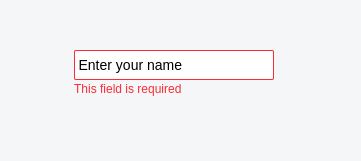
Screenshot
Styling
The directive applies the following styles/classes:
.input-errorclass to inputs (inputand.multiselect__tags) when an error is present..field-error.error-messageclasses to the generated error message<span>at the bottom of the container.- These target classes apply custom styling (such as red borders) matching the application's design system.
Notes
- Targets
<input>as well as.multiselect__tagsinside the bound container element to apply error borders. - Appends a
<span>with the error message at the end of the container. - Automatically cleans up error UI when the bound value becomes falsy (e.g.,
null,'',undefined). - Adds
.error-messageand.field-errorclasses to help target or style error messages. - Best use case is to display errors returned from backend form validation.