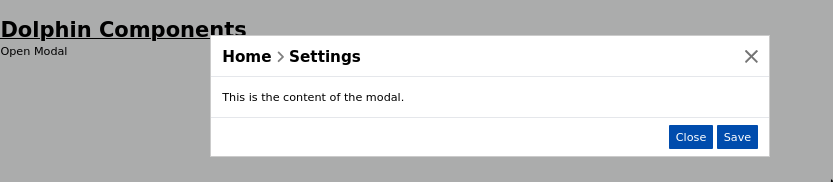
Appearance
Modal Component
A dialog overlay component that slides in from the top with a smooth transition. Supports breadcrumb-style titles, customizable action buttons, auto-sizing based on content height, and dynamic z-index stacking for nested modal support.
Table of Contents
- Import
- Basic Usage
- Props
- Events
- Slots
- TypeScript Interfaces
- Usage Examples
- Dynamic Z-Index Stacking
- Best Practices
- Troubleshooting
Import
ts
import { Modal } from "dolphin-components";
import type { ModalProps, ModalTitle, ModalAction } from "dolphin-components";
Basic Usage
vue
<template>
  <button @click="showModal = true" class="btn btn-primary">Open Modal</button>

  <Modal
    :show="showModal"
    :title="[{ name: 'Edit User' }]"
    :actions="[
      { title: 'Cancel', emit: 'onClose', class: 'btn btn-outline-secondary' },
      { title: 'Save', emit: 'onSave', class: 'btn btn-primary' },
    ]"
    @onClose="showModal = false"
    @onSave="handleSave"
  >
    <p>Modal content goes here.</p>
  </Modal>
</template>

<script setup lang="ts">
import { ref } from "vue";
import { Modal } from "dolphin-components";

const showModal = ref(false);

const handleSave = () => {
  console.log("Saving...");
  showModal.value = false;
};
</script>
Props
| Prop | Type | Default | Description |
|---|---|---|---|
show | boolean | false | Controls visibility of the modal. |
title | ModalTitle[] | [] | Breadcrumb-style title array. Each item can be plain text or a router link. |
actions | ModalAction[] | [] | Footer action buttons. Each button emits the specified event on click. |
width | string | "600px" | CSS width of the modal panel (e.g. "600px", "80%"). |
showClose | boolean | true | Show or hide the close (×) button in the top-right corner. |
Events
| Event | Payload | Description |
|---|---|---|
onClose | — | Emitted when the close button or a "close" action is clicked. |
[custom emit] | string | number | Custom events from action buttons. The event name comes from the emit property of the action. |
Slots
| Slot Name | Description |
|---|---|
default | The main content body of the modal. |
TypeScript Interfaces
typescript
interface ModalTitle {
  name: string;     // Display text
  link?: string;    // Optional Vue Router link path. Use '#' for a clickable link that emits onClose.
}

interface ModalAction {
  emit: string;     // Event name to emit when clicked
  title: string;    // Button label text
  class?: string;   // CSS class for the button (default: 'btn btn-primary')
}

interface ModalProps {
  title: ModalTitle[];
  actions?: ModalAction[];
  show: boolean;
  width?: string;
  showClose?: boolean;
}
Usage Examples
With Breadcrumb Title
vue
<Modal
  :show="showModal"
  :title="[
    { name: 'Users', link: '/users' },
    { name: 'Edit User' },
  ]"
  :actions="[{ title: 'Close', emit: 'onClose' }]"
  @onClose="showModal = false"
>
  <p>Breadcrumb navigation shows: Users > Edit User</p>
</Modal>
Custom Width
vue
<Modal
  :show="showWideModal"
  :title="[{ name: 'Report Preview' }]"
  width="900px"
  @onClose="showWideModal = false"
>
  <div>Wide modal content for data tables, charts, etc.</div>
</Modal>
Without Close Button
vue
<Modal
  :show="showConfirm"
  :title="[{ name: 'Confirm Action' }]"
  :showClose="false"
  :actions="[
    { title: 'Cancel', emit: 'onClose', class: 'btn btn-outline-secondary' },
    { title: 'Confirm', emit: 'onConfirm', class: 'btn btn-danger' },
  ]"
  @onClose="showConfirm = false"
  @onConfirm="handleConfirm"
>
  <p>Are you sure you want to delete this record?</p>
</Modal>
Nested Modals
The Modal component supports opening multiple modals simultaneously. Each new modal automatically receives a higher z-index so it stacks correctly on top of the previous one.
vue
<template>
  <button @click="showFirst = true" class="btn btn-primary">Open Modal</button>

  <Modal
    :show="showFirst"
    :title="[{ name: 'First Modal' }]"
    :actions="[
      { title: 'Open Nested', emit: 'openNested', class: 'btn btn-primary' },
      { title: 'Close', emit: 'onClose' },
    ]"
    @onClose="showFirst = false"
    @openNested="showSecond = true"
  >
    <p>This is the first modal.</p>
  </Modal>

  <Modal
    :show="showSecond"
    :title="[{ name: 'First Modal', link: '#' }, { name: 'Nested Modal' }]"
    :actions="[{ title: 'Close', emit: 'onClose' }]"
    @onClose="showSecond = false"
  >
    <p>This modal appears on top of the first one.</p>
  </Modal>
</template>

<script setup>
import { ref } from "vue";
import { Modal } from "dolphin-components";

const showFirst = ref(false);
const showSecond = ref(false);
</script>
With TypeScript
vue
<script setup lang="ts">
import { ref } from "vue";
import { Modal, type ModalTitle, type ModalAction } from "dolphin-components";

const showModal = ref(false);

const title: ModalTitle[] = [
  { name: "Settings", link: "/settings" },
  { name: "Profile" },
];

const actions: ModalAction[] = [
  { title: "Cancel", emit: "onClose", class: "btn btn-outline-secondary" },
  { title: "Save Changes", emit: "onSave", class: "btn btn-primary" },
];

const handleSave = () => {
  // Save logic
  showModal.value = false;
};
</script>

<template>
  <Modal
    :show="showModal"
    :title="title"
    :actions="actions"
    @onClose="showModal = false"
    @onSave="handleSave"
  >
    <form>
      <label>Name</label>
      <input class="input-text" />
    </form>
  </Modal>
</template>
Dynamic Z-Index Stacking
Added in v3.1.18
When multiple modals are open at the same time, the component automatically calculates the z-index based on how many .app-modal-panel elements are currently in the DOM:
- Base z-index:
11 - Each subsequent modal: increments by
10(e.g.,21,31, …) - Backdrop z-index: always
modal z-index - 1
This means you can freely nest modals without worrying about z-index conflicts. The calculation runs when show becomes true and after the enter transition completes.
Component Behavior
Auto Overflow
The modal body automatically becomes scrollable when its content exceeds window.innerHeight - 200px. A MutationObserver and ResizeObserver watch for content changes to dynamically apply or remove the scroll behavior.
Transition Animation
The modal uses a modal-load transition:
- Enter: Slides down from above with a fade-in (300ms ease)
- Leave: Slides up with a fade-out (300ms ease)
Teleport
The modal is rendered via <Teleport to="body"> to avoid CSS stacking context issues with parent containers.
Best Practices
- Always handle
onClose— Bind@onCloseto setshowback tofalse. Otherwise the modal cannot be dismissed. - Use breadcrumb titles for context — When opening a modal from a detail page, include the parent page name as a link for navigation context.
- Use
link: '#'— Settinglinkto'#'on a title item makes it clickable and emitsonClosewhen clicked (useful for breadcrumb "back" navigation). - Keep content height manageable — The modal automatically scrolls, but very tall content may benefit from internal tabs or pagination.
- Match action button classes — Use
btn btn-primaryfor primary actions andbtn btn-outline-secondaryfor cancel/dismiss actions.
Troubleshooting
Modal doesn't close when clicking backdrop
The backdrop is a visual overlay only. To close on backdrop click, add a click handler to the backdrop or use the close button / action buttons.
Modal appears behind other content
The modal uses z-index: 11 (base). If your app has elements with higher z-index values, the modal stacking may be affected. The dynamic z-index calculation helps with multiple modals but won't override external high-z-index elements.
Content not scrolling
The overflow detection runs via observers. If your content loads asynchronously, the modal will detect the height change and apply scroll. Ensure your content is inside the default slot.
Screenshot