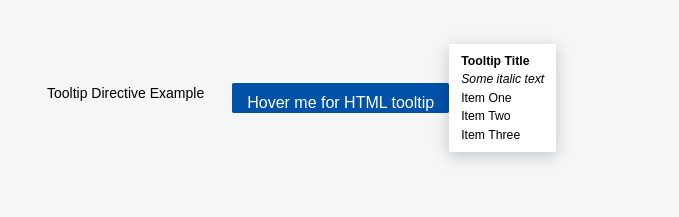
Appearance
Tooltip Directive
v-tooltip
A custom Vue directive that shows a tooltip with specified content on hover, dynamically positioning it relative to the element based on available viewport space.
Props (Binding Value)
| Type | Required | Example | Description |
|---|---|---|---|
Object | Yes | { content: 'Tooltip text', raw: false, preferredPosition: 'top' } | Configuration object specifying tooltip content and options |
The binding value is an object with the following optional properties:
content(string, required): The text or HTML content to display inside the tooltip.raw(boolean, default: false): Whether to render content as raw HTML.preferredPosition(string, default: 'top'): Preferred tooltip position ('top' | 'bottom' | 'left' | 'right').
Modifiers
N/A
Arguments
N/A
Slots
N/A (used as a directive, not a component)
Emits
N/A (directives do not emit events)
Functions
hasSpace(position, elRect, tooltipRect)
- Checks if there is enough space in the viewport to display the tooltip at the given position relative to the element.
- Parameters:
position— Position to check ('top' | 'bottom' | 'left' | 'right').elRect— Bounding rectangle of the target element.tooltipRect— Bounding rectangle of the tooltip element.
showTooltip()
- Creates and mounts the tooltip component.
- Calculates the best position for the tooltip, falling back to alternatives if the preferred position lacks space.
- Positions the tooltip absolutely on the page.
- Shows tooltip after a short delay to avoid flicker.
hideTooltip()
- Unmounts and removes the tooltip from the DOM.
- Clears any pending tooltip show timeouts.
delayedShowTooltip()
- Starts a short timeout (200ms) before showing the tooltip, to prevent flickering on quick mouse movements.
Usage Example
vue
//Default Load Example
<template>
  <button v-tooltip="{ content: 'Save changes', preferredPosition: 'right' }">
    Save
  </button>
</template>

//HMTL Element Load Example
<template>
  <button
    v-tooltip="{
      content: tooltipHtml,
      raw: true,
      preferredPosition: 'right',
    }"
    class="btn"
  >
    Hover Me
  </button>
</template>

<script lang="ts" setup>
const tooltipHtml = `
    <div>
      <strong>Tooltip Title</strong><br/>
      <em>Some italic text</em><br/>
      <ul>
        <li>Item One</li>
        <li>Item Two</li>
        <li>Item Three</li>
      </ul>
    </div>
  `;
</script>
Behavior Summary
- Tooltip shows on
mouseenterwith a 200ms delay. - Tooltip hides immediately on
mouseleave. - Tooltip content can be raw HTML or plain text.
- Tooltip automatically positions itself based on available viewport space.
- Cleans up event listeners and tooltip elements on unmount.
Notes
- Tooltip content is mounted as a separate Vue app instance attached to a dynamically created
<div>. - Supports dynamic positioning fallback if preferred position is not feasible.
- Uses high
z-indexto stay visible above other elements. - Tooltip DOM nodes are cleaned up to prevent memory leaks.
Screenshot