Appearance
Toggle Component
A labeled toggle button component that lets users switch between two states with visible text labels. Unlike a Switch which uses a sliding knob, the Toggle renders the on/off text directly inside the button for explicit state indication.
Table of Contents
Import
ts
import { Toggle } from "dolphin-components";
import type { ToggleProps } from "dolphin-components";
Basic Usage
vue
<template>
  <Toggle v-model="isActive" />
  <p>State: {{ isActive ? "On" : "Off" }}</p>
</template>

<script setup>
import { ref } from "vue";
import { Toggle } from "dolphin-components";

const isActive = ref(false);
</script>
Props
| Prop | Type | Default | Description |
|---|---|---|---|
modelValue | boolean | false | The current state of the toggle. Supports v-model. |
onText | string | "On" | Text displayed when the toggle is active (true). |
offText | string | "Off" | Text displayed when the toggle is inactive (false). |
width | string | "60px" | CSS width of the toggle button. |
disable | boolean | false | If true, the toggle is disabled and cannot be clicked. |
Events
| Event | Payload | Description |
|---|---|---|
update:modelValue | boolean | Emitted when the toggle state changes. Supports v-model. |
TypeScript Interfaces
typescript
interface ToggleProps {
  modelValue: boolean;
  onText?: string;
  offText?: string;
  width?: string;
  disable?: boolean;
}
Usage Examples
Calendar System Toggle (BS/AD)
A common use case in Nepali applications — toggling between Bikram Sambat and Gregorian calendars:
vue
<template>
  <Toggle v-model="isBS" onText="BS" offText="AD" />
  <p>Calendar: {{ isBS ? "Bikram Sambat" : "Gregorian" }}</p>
</template>

<script setup>
import { ref } from "vue";
import { Toggle } from "dolphin-components";

const isBS = ref(false);
</script>
Custom Labels and Width
vue
<template>
  <Toggle
    v-model="isSubscribed"
    onText="Subscribed"
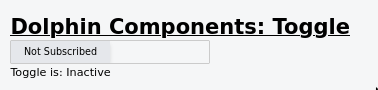
    offText="Not Subscribed"
    width="150px"
  />
</template>

<script setup>
import { ref } from "vue";
import { Toggle } from "dolphin-components";

const isSubscribed = ref(false);
</script>
Disabled State
vue
<template>
  <Toggle v-model="isLocked" onText="Active" offText="Inactive" :disable="true" />
  <p class="text-sm text-gray-500">This toggle is read-only.</p>
</template>

<script setup>
import { ref } from "vue";
import { Toggle } from "dolphin-components";

const isLocked = ref(true);
</script>
Form Settings Panel
vue
<template>
  <div class="space-y-3">
    <div class="flex items-center justify-between">
      <span>Status</span>
      <Toggle v-model="settings.active" onText="Active" offText="Inactive" width="80px" />
    </div>
    <div class="flex items-center justify-between">
      <span>Visibility</span>
      <Toggle v-model="settings.public" onText="Public" offText="Private" width="80px" />
    </div>
  </div>
</template>

<script setup>
import { reactive } from "vue";
import { Toggle } from "dolphin-components";

const settings = reactive({
  active: true,
  public: false,
});
</script>
Screenshot
Best Practices
- Use short, descriptive labels — Keep
onTextandoffTextconcise to fit within the toggle width. - Adjust width to match label length — If your labels are longer (e.g., "Subscribed"), increase the
widthprop accordingly. - Choose Toggle vs. Switch intentionally — Use Toggle when you want explicit text labels visible at all times. Use Switch for a cleaner, icon-only on/off control.
- Pair with a context label — Always add a label outside the toggle describing what it controls.
Troubleshooting
Toggle does not update when clicked
- Ensure
v-modelis bound to arefvariable. - Make sure
disableis not set totrue. - Check for any console errors.
Text gets cut off
- Increase the
widthprop to accommodate longeronText/offTextvalues.