Appearance
UploadImage Component
An image cropping interface presented in a modal window. Users can upload an image, adjust the crop area using drag and resize handles, and export the cropped result as a base64 image string. Supports PNG, JPG, JPEG, and WebP formats with configurable file size limits.
Table of Contents
Import
ts
import { UploadImage } from "dolphin-components";
import type { UploadImageProps } from "dolphin-components";
Basic Usage
vue
<template>
  <button @click="showCropper = true" class="btn btn-primary">Upload Photo</button>

  <UploadImage
    :show="showCropper"
    @onClose="showCropper = false"
    @onCrop="handleCrop"
  />
</template>

<script setup>
import { ref } from "vue";
import { UploadImage } from "dolphin-components";

const showCropper = ref(false);

const handleCrop = (base64Image: string) => {
  console.log("Cropped image:", base64Image);
  showCropper.value = false;
};
</script>
Props
| Prop | Type | Default | Description |
|---|---|---|---|
show | boolean | false | Controls visibility of the cropping modal. |
uploadSize | number | 2 | Maximum allowed image file size in MB. |
Events
| Event | Payload | Description |
|---|---|---|
onClose | — | Emitted when the modal is closed (via close button or cancel action). |
onCancel | — | Emitted when the cancel button is clicked. |
onReset | — | Emitted when the reset button is clicked (clears the current crop). |
onCrop | string | Emitted when the crop is confirmed. Payload is a base64 image string. |
Slots
This component does not provide any slots.
TypeScript Interfaces
typescript
interface UploadImageProps {
  show: boolean;
  uploadSize: number;
}
Usage Examples
Profile Picture Upload
vue
<template>
  <div class="flex items-center gap-4">
    <img
      v-if="profileImage"
      :src="profileImage"
      class="w-20 h-20 rounded-full object-cover"
      alt="Profile"
    />
    <div v-else class="w-20 h-20 rounded-full bg-gray-200 flex items-center justify-center">
      <Icons name="User" :size="32" color="gray" />
    </div>

    <button @click="showCropper = true" class="btn btn-outline-secondary">
      Change Photo
    </button>
  </div>

  <UploadImage
    :show="showCropper"
    :uploadSize="5"
    @onClose="showCropper = false"
    @onCrop="handleCrop"
  />
</template>

<script setup>
import { ref } from "vue";
import { UploadImage, Icons } from "dolphin-components";

const showCropper = ref(false);
const profileImage = ref("");

const handleCrop = (base64: string) => {
  profileImage.value = base64;
  showCropper.value = false;
};
</script>
With Custom Size Limit
vue
<UploadImage :show="showCropper" :uploadSize="10" @onCrop="handleCrop" @onClose="showCropper = false" />Screenshot
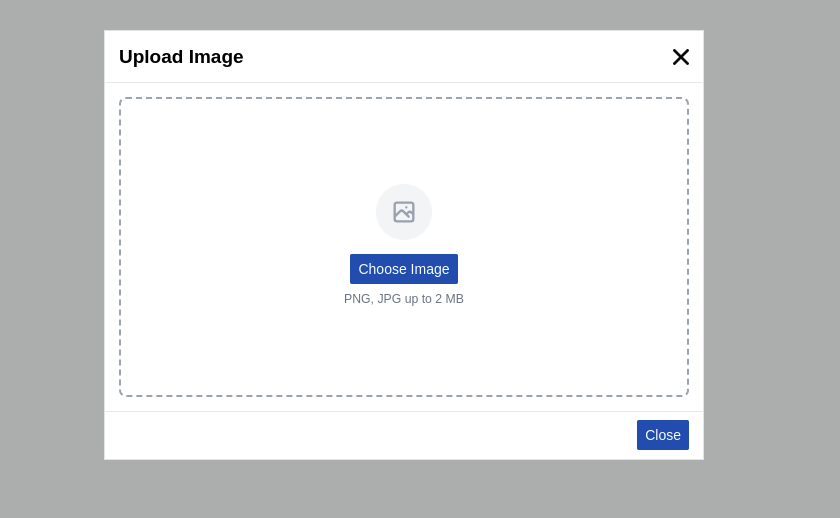
Supported Formats
| Format | MIME Type |
|---|---|
| PNG | image/png |
| JPG | image/jpeg |
| JPEG | image/jpeg |
| WebP | image/webp |
Cropping Features
- Drag to move the crop box within the image boundaries
- Corner handles to resize the crop area
- Minimum crop size: 50px × 50px
- Boundary constrained: Crop box cannot exceed image edges
- Base64 output: The cropped result is a base64-encoded image string ready for display or API upload
Best Practices
- Set reasonable size limits — Use
uploadSizeto prevent users from uploading excessively large images. - Close after crop — Set
showCropper = falsein the@onCrophandler for a clean workflow. - Preview the result — Show the cropped image immediately in an
<img>tag with the base64src. - Convert for API upload — If your backend expects a File/Blob instead of base64, convert it before sending.
Troubleshooting
Image not loading
- Verify the file format is supported (PNG, JPG, JPEG, WebP).
- Check that the file size is within the
uploadSizelimit.
Crop box too small
- The minimum crop size is 50px × 50px. Ensure the uploaded image is large enough.